
logo

Download    About    News    Contact & Disqus    Translation    Facebook

Categories

  • System Font Size
  • Colors and Appearance
  • System Utilities
  • Visually Impaired
  • Top Downloads

System Font Size

  • Advanced System Font Changer
  • System Font Size Changer
  • System Font Bold
  • Windows 10 system font settings
  • Desktop Icon Spacing
  • Simple System Font Changer

Colors

  • Classic Color Panel
  • Easy Dark Mode + Wallpaper Creator
  • Easy Invert
  • Black NotePad
  • Easy Window Invert
  • Large System Tray Clock

System Utilities

  • Windows Key Viewer
  • URL Blocker
  • Win10 All Settings
  • addLEDs
  • Start Everywhere
  • myResources
  • Precise CPU Stress
  • Classic Power Off
  • Extended GodMode
  • Explorer Commander
  • Integrity Downloader
  • NetGraph
  • Classic Auto Login
  • Tabbed Explorer
  • Dual Monitor Auto Mouse Lock

Windows Key Viewer

By using Windows Key Viewer, the current computer product key can be easily determined. In some cases it is very important to know the product key, e.g. when reinstalling the computer.

Generally, the product key can be found on the Windows installation kit or on a label on the computer. This label often gets damaged and becomes illegible, and when using multiple computers, installation packages can get mixed up. That is when Windows Key Viewer becomes useful, as the product key can be easily displayed with it.
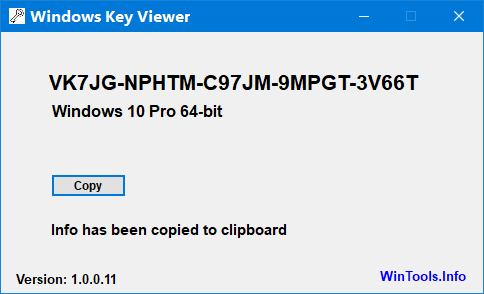
 

Windows Key Viewer Win10

  • 1
  • 2
  • 3
  • 4

© WinTools.Info - Owner and software developer: Peter Panisz - About - Contact - Home